An enterprise AI assistant that keeps your data in-house
Voiser Aura does the work your teams already do, with your company's own documents: it searches the policy, calculates the spreadsheet, writes the report and hands it over as a file. Every answer shows the document and page it relies on. Installed on a company server or a single computer, the models run on your own hardware.
- 3Deployment options: company server, single computer, Voiser Cloud
- 0Content leaving the company server while web search is off
- TurkishFirst: interface, search and answers designed for Turkish
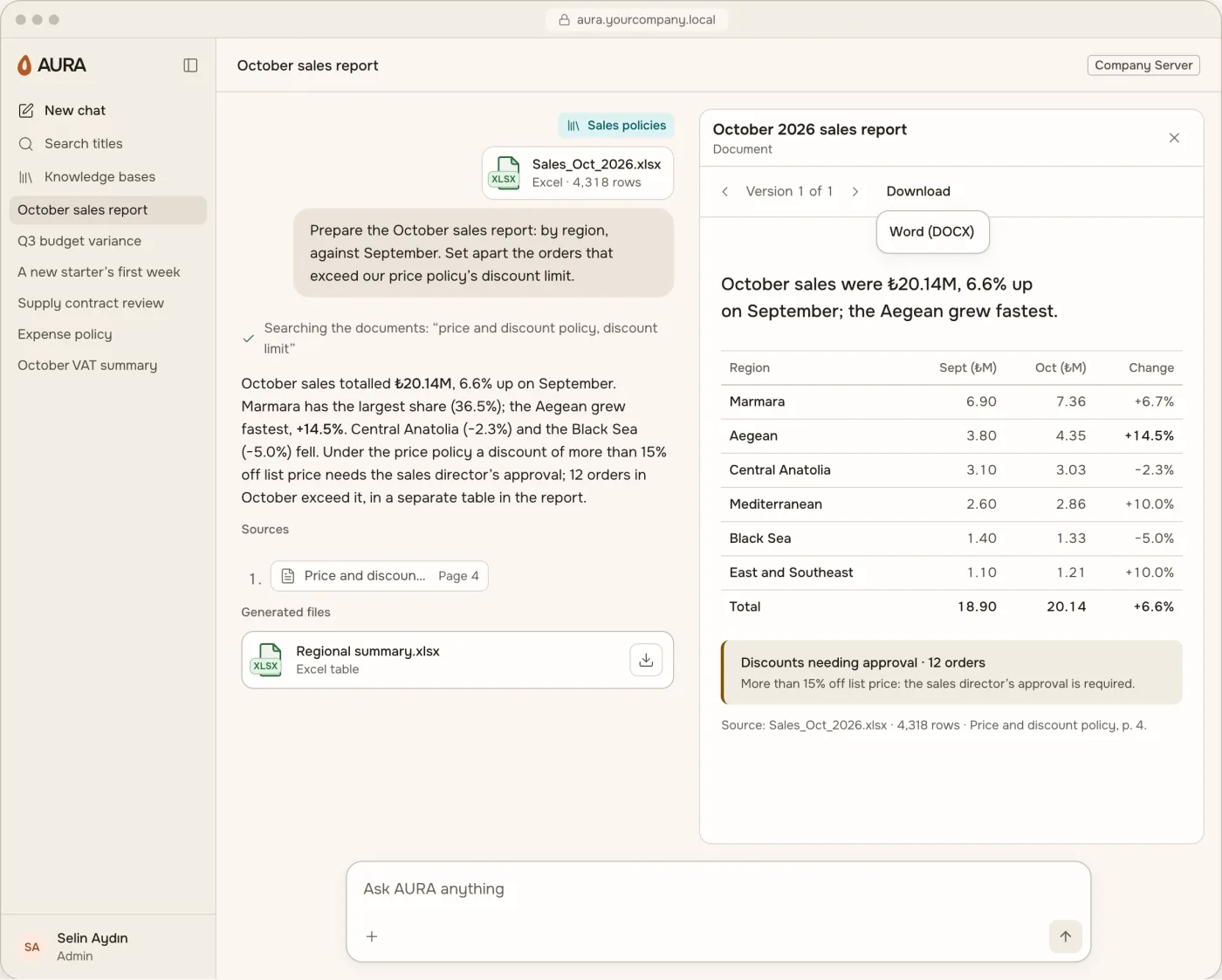
From question to finished file, in one window
It searches your documents, answers with the source it relies on, calculates your tables and delivers the result as a file. Your people no longer have to leave the company to get the same job done.
Answers with sources
Pick a knowledge base and ask; the answer shows the document and passage it relies on. Click the source and that page opens.
Attach a file and ask
Add a PDF, Word or PowerPoint file to the chat; Aura summarises, compares and answers your questions from that file.
Spreadsheet analysis
It totals, compares and finds variances in Excel or CSV figures. Calculations run in an isolated environment with no network.
Reports, charts and dashboards
The result opens next to the chat: a chart, table, dashboard or report page. Every change becomes a new version.
Ready-made files
Download the report as Word or as a UDF for Turkey's UYAP court system; calculation results come as Excel or CSV.
Web search under your control
On a company server or single computer it starts switched off and works only if your organisation turns it on. When on, only the search query and the addresses of opened pages leave.
One file, one sentence, a finished report
It turns your request into a plan and shows the plan on screen; at every step you can see which file a figure came from.
- 01
Write your request
Attach the file and say what you need in your own words.
- 02
It reads the file
It recognises the sheets, dates and amounts on its own.
- 03
It shows its plan
It writes down what it will calculate and how, before it starts.
- 04
It calculates and writes
Every figure comes straight from your file; the result is gathered on a report page.
- 05
It hands over the files
The report downloads as Word, the tables as Excel.
Three deployments, the same Aura
The interface, knowledge bases and file outputs are the same in all three; what differs is where the data lives. Output quality and speed depend on the hardware.
| Company Server | This Computer | Voiser Cloud | |
|---|---|---|---|
| Who it's for | Teams and the whole company | A single user or a trial | Organisations that would rather not manage hardware |
| Where data lives | On your company network | On this computer | On Voiser's servers |
| Hardware | Linux (Ubuntu 24.04) with an NVIDIA GPU, or a Mac; sized together with you | Apple Silicon Mac, macOS 26 or later, at least 16 GB of memory | None needed; Voiser runs the servers |
| Web search | Off by default; on if your organisation enables it | Off by default; on if your organisation enables it | On by default; your organisation can switch it off |
| Encrypted backup | With your own key, defined at installation | With your own key, defined at installation | This commitment does not apply to this option |
Every team does its own work, with its own documents
Sales and marketing
Regional sales reports, reasons behind lost quotes, follow-up emails from meeting notes.
Finance and accounting
VAT summaries from invoice lists, budget against actuals, the lines that go over.
Human resources
Leave calculations under your policy, a first-week plan for new starters, FAQs from the employee handbook.
Legal
Comparing contract versions, matching clauses against company policy, drafting UDF files for UYAP. It does not give legal advice; the decision is the lawyer's.
Operations and procurement
What changed in the latest version of a procedure; comparing three quotes on price and delivery time.
Management and quality
One-page summaries of weekly reports; grouping non-conformity records by root cause.
Your documents stay inside
Instead of banning employees from pasting documents into public AI tools, it gives them the company's own approved tool.
- Data stays on your network
- With a company server or single computer, the models run on your own hardware; documents, questions and answers are not sent out.
- A single exit gate
- Every outbound connection from the server passes through one gateway; Aura sends no usage data or error reports.
- Roles and permissions
- The owner of a knowledge base decides who can see it. The admin role cannot open other people's chats or documents; permissions are checked in both the application and the database.
- Logs without content
- Admin actions and permission changes are logged; the log records the event, not the content.
- Your documents don't train models
- No model is trained or fine-tuned on customer documents; documents are indexed for search only. The models are open-weight.
- Voiser Cloud, plainly
- With this option your data is kept on Voiser's servers and web search is on by default. If data must stay on your network, choose Company Server or This Computer.
More enterprise products from Voiser
Common questions
What is Voiser Aura?
An AI assistant that runs on your company's own hardware, or on Voiser's servers for organisations that prefer. It reads your documents, answers your questions with sources, prepares reports from your spreadsheets and delivers the result as Word or Excel files.
Which files does it work with?
Knowledge bases accept PDF, Word, Excel, PowerPoint, UYAP UDF and plain text. PDF, Word and PowerPoint files added to a chat are read; Excel and CSV files are calculated.
How do I know an answer is right?
Answers from a knowledge base show a source card; click the source to open the document page and the quoted passage. Aura does not make decisions; you do.
What hardware is needed, and who installs it?
For a trial, one Mac with Apple Silicon, macOS 26 or later and at least 16 GB of memory is enough. A team needs a workstation or server; the hardware is sized together with you and installed together with you.
Does it integrate with our existing systems?
Today files are added to a chat or a knowledge base; there are no ready connections to accounting, CRM, ERP, SharePoint or directory services. Your needs are discussed in a demo call.
Does it work in English?
Aura was designed Turkish-first: the interface, search and answers were built with Turkish in mind, and the product site is available in English. Ask about your languages in a demo call.
Let's set up your company's own AI assistant together
In a demo call we go through your teams' work, the hardware and your information-security questions together.