An AI interview assistant that runs inside your organisation
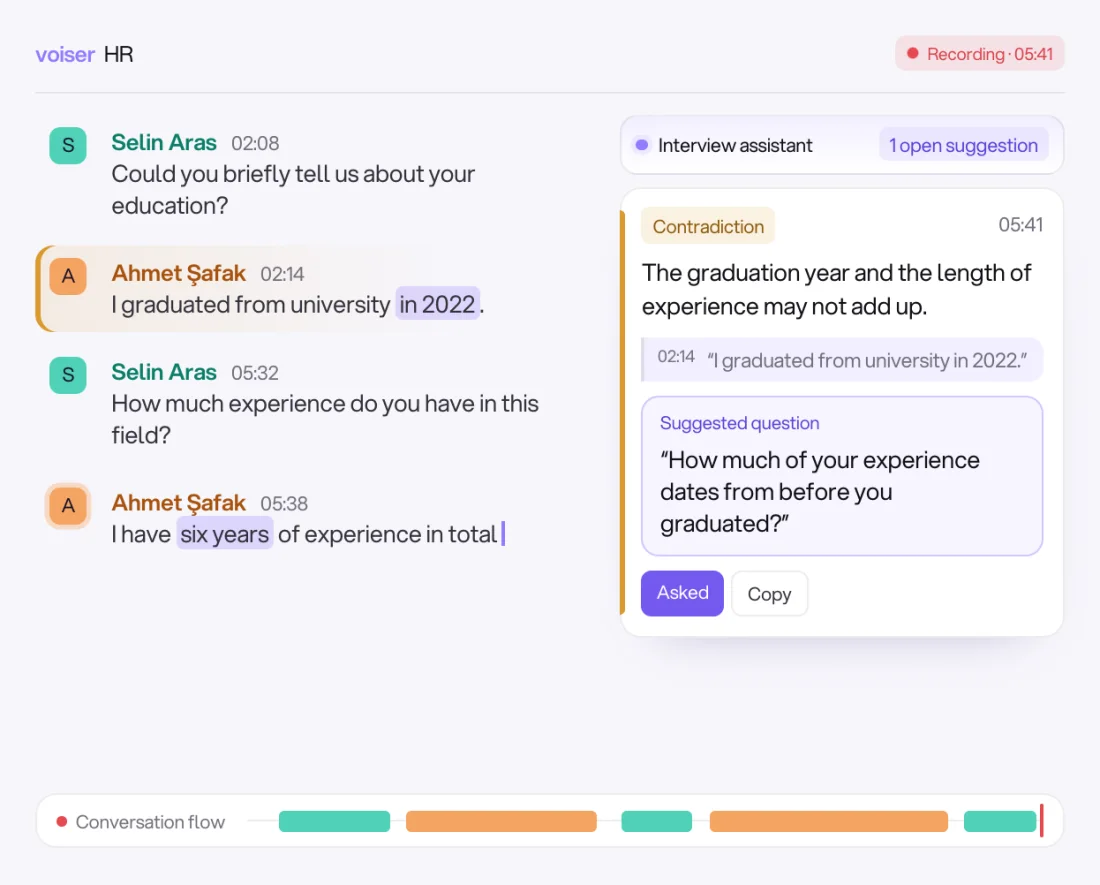
Voiser HR transcribes the interview live, tells the speakers apart and keeps every sentence with a timestamp. It spots contradictions and evasive answers and suggests a ready question to the interviewer; whether to ask it is always the interviewer's call. Everything runs on the interviewer's computer or on your organisation's own server.
- 0Recordings, transcripts or CVs sent to a cloud
- 5Export formats: PDF, Word, Excel, TXT, SRT
- Mac · WindowsDesktop app; no internet needed after installation
A quiet second pair of eyes beside the interviewer
It listens to every answer, notices what slips by and suggests the right question. The final decision always rests with the interviewer.
Live transcript
It transcribes Turkish speech instantly, tells speakers apart by their voices and keeps every sentence with a timestamp.
Interview assistant
It catches contradictions and evasive answers, shows the related sentences with timestamps and suggests a polite, clear follow-up question.
Calculations by rule
Calculations such as age, year of birth and length of experience are not left to the language model; they are done instantly, by rules.
No discriminatory questions
On topics that can lead to discrimination, such as pregnancy, religion, politics and health, the assistant never suggests a question.
Summary and minutes
When the recording ends, the interview is transcribed again with a more accurate model and the speakers are separated again; a summary, highlights and open questions are prepared.
Ask the interview
Ask questions such as "Did the candidate mention salary expectations?" and get an answer with the time of each sentence it relies on. It never mixes up what the CV says with what was said in the interview.
From interview to minutes, on the same computer
Speech recognition, speaker separation and the interview assistant come inside the app.
- 01
Start recording
Open the interview under the related job posting and attach the candidate's CV.
- 02
Live transcript
Speech is transcribed instantly and speakers are told apart by voice.
- 03
The assistant suggests
If it notices a contradiction or an evasive answer, it suggests a follow-up question with the related sentences.
- 04
The summary is prepared
When the interview ends, the text is refined; the summary, highlights and open questions appear on one screen.
- 05
Export the minutes
Export as PDF, Word, Excel, TXT or SRT in one click.
Runs on your own computer
On first launch the app shows a machine code; send it to Voiser and you receive a licence key for that computer.
| Mac | Windows | |
|---|---|---|
| Processor / graphics | Apple Silicon (M1 or later) | NVIDIA graphics card (12 GB) |
| Operating system | macOS 14 or later | Windows 10 / 11 (64-bit) |
| Memory | 16 GB | 16 GB |
| Free disk space | 10 GB | 15 GB |
| Internet | Not needed after installation | Not needed after installation |
Every team that interviews
Recruiters
Focus on the candidate instead of taking notes; the minutes are ready as soon as the interview ends. Interviews sit under each job posting, with candidates and their CVs.
Hiring managers
Ask the interview questions afterwards and get answers with the time of each sentence; in group interviews, findings are listed candidate by candidate.
Organisations with sensitive data
Recordings, transcripts and CVs never leave the organisation; the app makes no external connections.
Everything stays inside your organisation
Voiser HR is not a cloud service: it runs on the interviewer's computer or on your organisation's own server.
- Data stays on the device
- Recordings, transcripts and CVs stay on the device it is installed on; nothing is sent to a cloud or any outside service.
- No outside connections
- The app makes no external connections. Speech recognition, speaker separation and the language model run on the same device, offline.
- You set the retention period
- Recordings are deleted automatically when the period you set ends.
- Corrections are tracked
- You can fix a misheard word or move a line to the right speaker; the original is always kept.
More enterprise products from Voiser
Common questions
Does it need an internet connection?
Not after installation. Speech recognition, speaker separation and the interview assistant come inside the app and work offline.
Which language does it work in?
Live transcription currently works for Turkish speech.
Does the assistant evaluate candidates?
No. The assistant points out contradictions and evasive answers and suggests questions; whether to ask, and the final decision, always rest with the interviewer.
How do I get a licence?
On first launch the app shows a machine code. Send the code to Voiser and you receive a licence key for that computer.
In which formats can I export the minutes?
PDF and Word (title, participants, summary, findings and the full transcript), Excel (each line of speech on its own row), TXT and an SRT subtitle file matched to the recording.
How long are recordings kept?
You set the retention period; when it ends, recordings are deleted automatically.
Add an AI interview assistant that runs inside your organisation
Download it for your Mac or Windows computer; no internet needed after installation.